Home Study Courses
Earn EMDRIA Credits and CEs by reading, listening to or watching these programs and completing an examination.
12 Credit Programs
Strengthening the Self Course (Audio/Transcript)
-
Summary
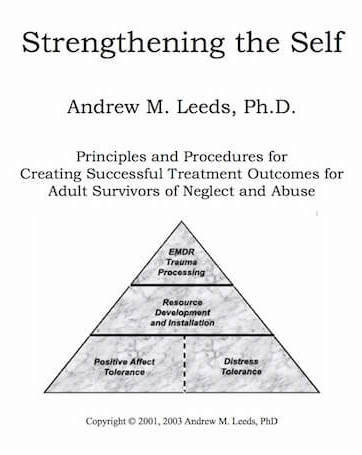
Principles and Procedures for Creating Successful Treatment Outcomes for Adult Survivors of Neglect & Abuse
This home study course (available in audio or near verbatim transcript) provides the theoretical framework and organizing principles for incorporating affect tolerance, Resource Development, and Installation, and EMDR trauma reprocessing into successful overall treatment plans.
Principles for case formulation and treatment planning are presented that integrate adult attachment status, the formation of affect scripts and emotional self-regulation capacities, the severity of dissociative symptoms as well as specific traumatic experiences.
Participants will learn specific treatment strategies and methods for working with adults whose childhood failed to meet basic needs for stability and attachment and who may have been exposed to chronic trauma. -
Objectives
Participants will determine how to enhance the therapeutic alliance and to build a detailed yet flexible treatment plan in complex cases.
Participants will describe how to sequence development of needed resources and processing specific memories in three stages of recovery:
a) stabilization and safety;
b) resolving loss and traumatic memories;
c) reconnection and strengthening of identity.
Participants will be able to describe key research on affect theory, attachment theory, the developmental neurobiology of affect regulation and the formation of maladaptive schemas.
Participants will apply principles and strategies to assess adult attachment status to aid in planning advanced treatment and intervention strategies.
Participants will apply fundamental principles and specific procedures to develop affect tolerance and to develop and install resources for strengthening self-capacities and reworking maladaptive schemas.
Participants will identify practical self-care strategies for patients and clinicians.
Participants will prevent crises by working through potential problems including transference and counter transference issues.
Participants will assess challenging cases that illustrate case formulation and treatment planning. -
Credits
EMDRIA Credits
Andrew M. Leeds is an approved EMDRIA Credit Provider #99019. This home study program has been approved for 12 EMDRIA Credit hours. Andrew M. Leeds, Ph.D. maintains responsibility for this program and its content in accordance with EMDRIA Standards. Full completion of an EMDRIA Approved Basic EMDR Training is required to earn EMDRIA credits.
12 continuing education credits for relicensure are available for listed mental health professionals.
CPA Accredited: 12 hours. Sonoma Psychotherapy Training Institute is approved by the California Psychological Association (CPA) to provide continuing professional education for psychologists. The California Board of Behavioral Sciences (BBS) recognizes CPA continuing education credit for license renewal for LCSWs and MFTs. Sonoma Psychotherapy Training Institute maintains responsibility for this program and its contents.
BBS: 12 hours of continuing education credit. The California Board of Behavioral Sciences (BBS) recognizes CPA continuing education credit for license renewal for California LCSWs and MFTs. Andrew M. Leeds, Ph.D. and Sonoma Psychotherapy Training Institute maintain responsibility for this program and its contents. (Provider #SON012). For California, this course meets the qualifications for 12 hours of continuing education credit for MFT's and LCSW's as required by the California Board of Behavioral Sciences. Please note the BBS limits licensee's to 18 hours (one half of the total 36 required hours) of self study learning per renewal cycle.
NBCC: 12 clock hours. Andrew M. Leeds has been approved by NBCC as an Approved Continuing Education Provider, ACEP No. 6093. Programs that do not qualify for NBCC credit are clearly identified. Andrew M. Leeds is solely responsible for all aspects of the programs.
-
Purchase
Digital Audio Download Options:
- Course materials only without credits ($115)
- 12 EMDRIA credits with course materials ($180)
- 12 CEs for relicensure and course materials ($190)
- Both 12 EMDRIA credits and 12 CEs for relicensure and course materials ($235)
Exam credit only Options:
- 12 EMDRIA credits ($65)
- 12 CEs for relicensure ($75)
- Both 12 EMDRIA credits and 12 CEs for relicensure ($120)
Course exam only for those who previously purchased the audio or transcript for the Strengthening the Self course without exam credits and now only need to purchase EMDRIA credits or CE's towards license renewal.
Digital Transcript Download Options:
- Course materials only without credits ($67)
- 12 EMDRIA credits with course materials ($132)
- 12 CEs for relicensure and course materials ($142)
- Both 12 EMDRIA credits and 12 CEs for relicensure and course materials ($187)
A Guide to EMDR (Book Course)

-
Summary
- Read A Guide to the Standard EMDR Therapy Protocols for Clinicians, Supervisors and Consultants by Andrew M. Leeds, Ph.D.
- Take a written exam
- Earn 12 EMDRIA Credits and CEs.
You may read either the 1st edition (2009) or the 2nd edition (2016) of the book for this exam course. However, we strongly recommend the 2nd edition.
To complete this course, you must purchase the book separately. -
Objectives
Participants will describe key principles of the Adaptive Information Processing Model and the elements of Shapiro’s (2001) and Leeds’s (2009) models of maladaptive memory networks.
Participants will determine whether clients meet standardized criteria for readiness for EMDR reprocessing or need extended preparation.
Participants will develop a framework for case conceptualization and for organizing and implementing treatment plans and a planned sequence of targets for EMDR reprocessing.
Participants will describe the purpose and carry out with adequate fidelity each of the steps in the Assessment Phase (Three) of the standard EMDR procedural steps.
Participants will make decisions informed by EMDR and AIP principles about selecting interventions to restore efficient reprocessing.
Participants will recognize when to offer an interweave selected from the themes of Responsibility, Safety and Choice and when to “stay out of the way.”
Participants will describe the purpose and carry out the Installation and Body Scan Phases (5 and 6) of the standard EMDR procedural steps.
Participants will develop and carry out effective treatment plans for applying EMDR to phobias of a traumatic origin. -
Credits
EMDRIA Credits
Andrew M. Leeds is an approved EMDRIA Credit Provider #99019. This home study program has been approved for 12 EMDRIA Credit hours. Andrew M. Leeds, Ph.D. maintains responsibility for this program and its content in accordance with EMDRIA Standards. Full completion of an EMDRIA Approved Basic EMDR Training is required to earn EMDRIA credits.
12 continuing education credits for relicensure are available for listed mental health professionals.
CPA Accredited: 12 hours. Sonoma Psychotherapy Training Institute is approved by the California Psychological Association (CPA) to provide continuing professional education for psychologists. The California Board of Behavioral Sciences (BBS) recognizes CPA continuing education credit for license renewal for LCSWs and MFTs. Sonoma Psychotherapy Training Institute maintains responsibility for this program and its contents.
BBS: 12 hours of continuing education credit. The California Board of Behavioral Sciences (BBS) recognizes CPA continuing education credit for license renewal for California LCSWs and MFTs. Andrew M. Leeds, Ph.D. and Sonoma Psychotherapy Training Institute maintain responsibility for this program and its contents. (Provider #SON012). For California, this course meets the qualifications for 12 hours of continuing education credit for MFT's and LCSW's as required by the California Board of Behavioral Sciences. Please note the BBS limits licensee's to 18 hours (one half of the total 36 required hours) of self study learning per renewal cycle.
NBCC: 12 clock hours. Andrew M. Leeds has been approved by NBCC as an Approved Continuing Education Provider, ACEP No. 6093. Programs that do not qualify for NBCC credit are clearly identified. Andrew M. Leeds is solely responsible for all aspects of the programs. -
Notes
The examination includes 60 multiple choice items. You must score 75% or more to pass.
Full completion of an EMDRIA Approved Basic EMDR Training is required to earn EMDRIA credits. You do not have to be trained in EMDR to earn CE with this course. Completion of this home study book examination course does not constitute training in EMDR. If you earn CE only now, and later complete an EMDRIA Approved Basic EMDR Training, you may then purchase the EMDRIA Credit portion and retake the exam for EMDRIA credits. -
Purchase
A Guide to the Standard EMDR Protocols Book credit exam only (book purchased separately)
Options:- 12 EMDRIA credits ($65)
- 12 CEs for relicensure ($75)
- Both 12 EMDRIA credits and 12 CEs for relicensure ($120)
-
Book Details
A Guide to the Standard EMDR Therapy Protocols for Clinicians, Supervisors and Consultants provides clear, concise treatment guidelines on the clinical use of EMDR and serves as a resource for practicing clinicians, consultants, supervisors, clinic directors, and hospital administrators.
This book provides an orientation to the clinical, professional, and risk management issues involved in integrating EMDR into clinical practice. The book provides sample consultation agreements and forms for documenting treatment planning, case summaries, and treatment outcomes. These forms will be especially helpful for case managers and clinical supervisors in agencies and community health treatment centers.
Key features:- Charts, forms, illustrations, tables, and clinical decision trees, present essential information clearly and concisely to guide treatment planning and documentation.
- Clinical case studies with transcripts illustrate the standard protocols with clear guidelines for informed decision making.
- Covers ethical and professional issues in clinical application, consultation, supervision, and research.
- Provides an overview of the stages of clinical skill development.
EMDR and Dissociation (Book Course)

-
Summary
- Read EMDR and Dissociation: The Progressive Approach by Anabel Gonzalez & Dolores Mosquera
- Take a written exam
- Earn 12 EMDRIA Credits and CEs.
To complete this course, you must purchase the book separately. -
Objectives
Participants will be able to identify frequent difficulties and common warning signs of structural dissociation and dissociative disorders and thereby minimize technical errors.
Participants will be able to define and use specific terms related to the treatment of individuals with dissociative disorders including: complex trauma; structural dissociation; dissociative parts of the personality; apparently normal parts (ANP) and emotional parts (EP) of the personality; action systems; primary, secondary and tertiary structural dissociation; and dissociative phobias.
Participants will be able to actively use EMDR therapy in the early phases of treatment on dissociative phobias based on an expanded AIP model of dysfunctionally stored information (DSI) that includes interoceptive information related to dissociative phobias and psychological defenses.
When working with clients with dissociative disorders, participants will be able to make use of alternate EMDR therapy procedures to enhance development of high order mental functions including capacities for mindfulness, metacognitive awareness and mentalization.
When working with clients with dissociative disorders, participants will be able to implement successful communication and EMDR therapy interventions based on working with the Adult Self in the Meeting Place Procedure.
Participants will implement EMDR therapy skills for helping clients with dissociative disorders to develop healthier patterns of self-care.
Participants will use EMDR therapy to resolve dissociative phobias, permitting clients to progressively approach, access and reprocess traumatic memories in a safe and effective way.
Participants will recognize and successfully work through challenges in the therapeutic relationship with clients with dissociative disorders.
Participants will implement a “progressive approach” – in contrast to an “all or nothing” strategy for working with traumatic memories in clients with dissociative disorders including the use of the Tip of the Finger Strategy (TFS). -
Credits
EMDRIA Credits
Andrew M. Leeds is an approved EMDRIA Credit Provider #99019. This home study program has been approved for 12 EMDRIA Credit hours. Andrew M. Leeds, Ph.D. maintains responsibility for this program and its content in accordance with EMDRIA Standards. Full completion of an EMDRIA Approved Basic EMDR Training is required to earn EMDRIA credits.
12 continuing education credits for relicensure are available for listed mental health professionals.
CPA Accredited: 12 hours. Sonoma Psychotherapy Training Institute is approved by the California Psychological Association (CPA) to provide continuing professional education for psychologists. The California Board of Behavioral Sciences (BBS) recognizes CPA continuing education credit for license renewal for LCSWs and MFTs. Sonoma Psychotherapy Training Institute maintains responsibility for this program and its contents.
BBS: 12 hours of continuing education credit. The California Board of Behavioral Sciences (BBS) recognizes CPA continuing education credit for license renewal for California LCSWs and MFTs. Andrew M. Leeds, Ph.D. and Sonoma Psychotherapy Training Institute maintain responsibility for this program and its contents. (Provider #SON012). For California, this course meets the qualifications for 12 hours of continuing education credit for MFT's and LCSW's as required by the California Board of Behavioral Sciences. Please note the BBS limits licensee's to 18 hours (one half of the total 36 required hours) of self study learning per renewal cycle.
NBCC: 12 clock hours. Andrew M. Leeds has been approved by NBCC as an Approved Continuing Education Provider, ACEP No. 6093. Programs that do not qualify for NBCC credit are clearly identified. Andrew M. Leeds is solely responsible for all aspects of the programs. -
Notes
The examination includes 60 multiple choice items. You must score 75% or more to pass.
Full completion of an EMDRIA Approved Basic EMDR Training is required to earn EMDRIA credits. You do not have to be trained in EMDR to earn CE with this course. Completion of this home study book examination course does not constitute training in EMDR. If you earn CE only now, and later complete an EMDRIA Approved Basic EMDR Training, you may then purchase the EMDRIA Credit portion and retake the exam for EMDRIA credits. -
Purchase
EMDR and Dissociation Book credit exam (book purchased separately)
Options:- 12 EMDRIA credits ($65)
- 12 CEs for relicensure ($75)
- Both 12 EMDRIA credits and 12 CEs for relicensure s ($120)
-
Authors

Anabel Gonzalez works as psychiatrist and psychotherapist in the Public Mental Health System and in Private Practice. She coordinates a Trauma and Dissociation Program in the University Hospital of A Coruña, Spain, and has a broad clinical experience with Dissociative Disorders and Complex Trauma. She is trained in diverse psychotherapeutic approaches including systemic family and group therapy, cognitive analytic therapy and several trauma-oriented psychotherapies. She is an EMDR Europe Supervisor, a Facilitator and Vice-President of the EMDR Spanish Association. She gives regular Advanced Trainings with the EMDR Spanish Association, and has presented several workshops and courses about EMDR interventions mainly in complex trauma, dissociation and severe mental disorder. She is a member of ESTD and ISST-D. She is the author of several articles, book chapters and a book about Dissociative Disorders.

Dolores Mosquera is psychologist and psychotherapist. She is the director of three Private Practice Clinics, specializing in the treatment of Personality Disorders, complex trauma and dissociation. She has been trained in several psychotherapeutic approaches and is an EMDR Europe Trainer, Supervisor and Facilitator. She has extensive teaching experience, leading seminars, workshops and lectures throughout Spain and Europe. She has published 12 books and many articles on personality disorders, complex trauma and dissociation and is a recognized expert in this field.
Borderline PD and EMDR Therapy (Book Course)

-
Summary
- Read Borderline Personality Disorder and EMDR Therapy by Dolores Mosquera and Anabel Gonzalez
- Take a written exam
- Earn 12 EMDRIA Credits and CEs.
To complete this course, you must purchase the book separately. -
Objectives
- Participants will be able to identify and describe BPD criteria in relationship to the AIP model and the EMDR perspective as well as how BPD symptoms can be linked to traumatic events.
- Participants will develop practical skills for dealing with frequent problems in the history-taking phase of treatment.
- Participants will be able to describe a conceptual model for understanding the effects of complex traumatization and neglect in the development of BPD.
- Participants will be able to recognize and respond to the specific clinical challenges encountered in each of the phases of EMDR therapy for clients with BPD including emotional dysregulation, dissociation and maladaptive defenses.
- Participants will evaluate their own relational difficulties with this clinical population and will be able to apply coping strategies for managing these relational challenges.
- Through an analysis of case examples, participants will be able to select options for responding to specific relational challenges and will be able to conceptualize these challenges in the therapeutic relationship as reflecting specific aspects of the client’s traumatic history.
- Through detailed exposition of specific procedures and sample vignettes, participants will be able to skillfully apply modified EMDR procedures for clients with Borderline Personality Disorder including procedures for enhancing client self-care.
-
Credits
EMDRIA Credits
Andrew M. Leeds is an approved EMDRIA Credit Provider #99019. This home study program has been approved for 12 EMDRIA Credit hours. Andrew M. Leeds, Ph.D. maintains responsibility for this program and its content in accordance with EMDRIA Standards. Full completion of an EMDRIA Approved Basic EMDR Training is required to earn EMDRIA credits.
12 continuing education credits for relicensure are available for listed mental health professionals.
CPA Accredited: 12 hours. Sonoma Psychotherapy Training Institute is approved by the California Psychological Association (CPA) to provide continuing professional education for psychologists. The California Board of Behavioral Sciences (BBS) recognizes CPA continuing education credit for license renewal for LCSWs and MFTs. Sonoma Psychotherapy Training Institute maintains responsibility for this program and its contents.
BBS: 12 hours of continuing education credit. The California Board of Behavioral Sciences (BBS) recognizes CPA continuing education credit for license renewal for California LCSWs and MFTs. Andrew M. Leeds, Ph.D. and Sonoma Psychotherapy Training Institute maintain responsibility for this program and its contents. (Provider #SON012). For California, this course meets the qualifications for 12 hours of continuing education credit for MFT's and LCSW's as required by the California Board of Behavioral Sciences. Please note the BBS limits licensee's to 18 hours (one half of the total 36 required hours) of self study learning per renewal cycle.
NBCC: 12 clock hours. Andrew M. Leeds has been approved by NBCC as an Approved Continuing Education Provider, ACEP No. 6093. Programs that do not qualify for NBCC credit are clearly identified. Andrew M. Leeds is solely responsible for all aspects of the programs. -
Notes
The examination includes 60 multiple choice items. You must score 75% or more to pass.
Full completion of an EMDRIA Approved Basic EMDR Training is required to earn EMDRIA credits. You do not have to be trained in EMDR to earn CE with this course. Completion of this home study book examination course does not constitute training in EMDR. If you earn CE only now, and later complete an EMDRIA Approved Basic EMDR Training, you may then purchase the EMDRIA Credit portion and retake the exam for EMDRIA credits. -
Purchase
Borderline PD and EMDR Therapy credit exam (book purchased separately)
Options:- 12 EMDRIA credits ($65)
- 12 CEs for relicensure ($75)
- Both 12 EMDRIA credits and 12 CEs for relicensure s ($120)
-
Authors
Dolores Mosquera is psychologist and psychotherapist. She is the director of three Private Practice Clinics, specializing in the treatment of Personality Disorders, complex trauma and dissociation. She has been trained in several psychotherapeutic approaches and is an EMDR Europe Trainer, Supervisor and Facilitator. She has extensive teaching experience, leading seminars, workshops and lectures throughout Spain and Europe. She has published 12 books and many articles on personality disorders, complex trauma and dissociation and is a recognized expert in this field.
Anabel Gonzalez works as psychiatrist and psychotherapist in the Public Mental Health System and in Private Practice. She coordinates a Trauma and Dissociation Program in the University Hospital of A Coruña, Spain, and has a broad clinical experience with Dissociative Disorders and Complex Trauma. She is trained in diverse psychotherapeutic approaches including systemic family and group therapy, cognitive analytic therapy and several trauma-oriented psychotherapies. She is an EMDR Europe Supervisor, a Facilitator and Vice-President of the EMDR Spanish Association. She gives regular Advanced Trainings with the EMDR Spanish Association, and has presented several workshops and courses about EMDR interventions mainly in complex trauma, dissociation and severe mental disorder. She is a member of ESTD and ISST-D. She is the author of several articles, book chapters and a book about Dissociative Disorders.
EMDR treatment planning with survivors of complex, early neglect and abuse (Video Course)

-
Summary
- Watch the webinar video and read the handout for “EMDR treatment planning with survivors of complex, early neglect and abuse” by Andrew M. Leeds, Ph.D.
- Take a written exam
- Earn 12 EMDRIA Credits.
The examination for this distance learning course serves as a study guide and evaluation of learning. -
Objectives
- Participants will apply EMDR therapy (Leeds, 2016; Shapiro, 2001) to resolve a range of presenting complaints in cases of symptoms of complex posttraumatic stress disorder including affect dysregulation, re-experiencing, avoidance, compulsive re-enactment, depression, panic and agoraphobia.
- Participants will incorporate awareness of patient’s adult attachment classification (Cassidy and Shaver, 1999; Main, 1996) and degree of Structural Dissociation (van der Hart, Nijenhuis, and Steele, 2006) across all eight phases of EMDR therapy.
- Participants will enhance or extend the preparation phase (Phase 2) to develop emotional self-regulation and assertive coping skills with Resource Development and Installation (Korn and Leeds, 2002; Leeds, 2016) when needed.
- Participants will assess and resolve avoidance defenses through the use of the Loving Eyes procedures (Gonzalez, Mosquera, Knipe and Leeds, 2012; Knipe, 2015). and the CIPOS (Knipe, 2010, 2015).
- Participants will select optimal sequences of past, present and future targets to effectively resolve patient symptoms with case formulations based on a) the Adaptive Information Processing Model (AIP: Leeds, 2016; Shapiro, 2001), b) attachment classification, and c) degree of structural dissociation.
-
Credits
12 EMDRIA Credits
Andrew M. Leeds is an approved EMDRIA Credit Provider #99019. This home study program (99019-DL66) has been approved for 12 EMDRIA Credit hours. Andrew M. Leeds, Ph.D. maintains responsibility for this program and its content in accordance with EMDRIA Standards. Full completion of an EMDRIA Approved Basic EMDR Training is required to earn EMDRIA credits.
Please note: No continuing education credits for relicensure are offered with this course. -
Notes
The examination includes 60 multiple choice items. You must score 75% or more to pass.
Prior full completion of an EMDRIA Approved Basic EMDR Training is required to earn EMDRIA credits. Completion of this home study video examination course does not constitute training in EMDR. -
Purchase
The course includes
- 12 hours of recorded video from a live webinar with audience questions
- The complete 144 page handout with all PPT slides and references
Options:
You may rent or purchase this course with or without EMDRIA Credits.
You may also purchase EMDRIA Credits separately later.- Rent $119 without EMDRIA Credits with one 72 hour viewing period within 30 days of rental.
- Buy $199 without EMDRIA Credits and watch as many times as you like.
- Rent $255 with EMDRIA Credits with one 72 hour viewing period within 30 days of rental.
- Buy $335 with EMDRIA Credits and watch as many times as you like.
- Purchase 12 EMDRIA credits only ($136)
-
Presenter

Dr. Andrew M. Leeds, Ph.D. is a California licensed Psychologist and Marriage and Family Therapist with over 40 years of private practice psychotherapy experience. He maintains a practice in Santa Rosa, California where he specializes in the assessment and treatment of acute and chronic Posttraumatic Stress Disorder (PTSD), anxiety, depression and dissociative disorders, and provides relationship counseling. He also provides group and individual consultation for clinicians regarding the application of EMDR.
Dr. Leeds is an EMDRIA Approved Consultant and Instructor in EMDR and an EMDR Europe accredited EMDR trainer. He has conducted EMDR training for more than 15,000 clinicians at some 150 training programs in the United States, Canada, France, England and Japan. Dr. Leeds received initial training in EMDR in 1991. He is the author of A Guide to the Standard EMDR Therapy Protocols for Clinicians, Supervisors, and Consultants, 2nd Ed. (2016, Springer Publishing Company: New York) book chapters and journal articles.
3.0 and 1.5 EMDRIA Credit Programs
Beyond Resistance: Learning from impasses, ruptures, and inadequacy in EMDR therapy (a recorded webinar)

-
Summary
Beyond Resistance: Learning from impasses, ruptures, and inadequacy in EMDR therapy
Presenter Andrew M. Leeds, PhD - 3.0 EMDRIA Credits
This a recorded video of a live webinar held October 18, 2025
This presentation explores experiences of clinical impasses, ruptures in the alliance, and therapist feelings of inadequacy in delivering EMDR therapy. These clinical experiences will be normalized and explored through reviews of theory, research, and clinical vignettes. Together, we will consider what to do when familiar strategies do not lead to clinical gains and progress appears to be stalled. We will consider how different clinical stances impact opportunities for repair and strengthening of the alliance when ruptures occur. We will explore strategies for coping with the countertransference experience of inadequacy when feelings of shame can cloud reflective function. Participants will consider how to learn about and develop confidence with the expanding number of standardized EMDR protocols, EMDR-derived techniques, and theoretical models relevant to EMDR clinicians.
Don't miss this opportunity to delve into the complexities of EMDR therapy, gain practical insights, and develop strategies for addressing client and clinician fears in trauma work. Elevate your practice by purchasing or renting this webinar today to gain essential insights. -
Credits
EMDRIA Credits only
Andrew M. Leeds is an approved EMDRIA Credit Provider #99019. The program listed above has been approved for 3.0 EMDRIA Credit hours: #99019-DL73. Andrew M. Leeds, Ph.D. maintains responsibility for this distance learning program.
No continuing education hours
Continuing education hours for re-licensure are not available for this program. -
Notes
This a recorded video of a live webinar held October 18, 2025
Included when you rent or purchase the videocast, you may also download- The webinar handout as a PDF including supplemental resources, and the reference list.
- The 3 EMDRIA Credit examination PDF.
-
Purchase
Available "With" or "Without" EMDRIA Credits
Options:- Without EMDRIA Credits (Rent $39, Buy $79)
- With 3 EMDRIA Credits (Rent $78, Buy $118)
- Exam Credit Only ($39)
The Positive Affect Tolerance protocol: Learning to feel good sharing positive emotions (a recorded webinar)

-
Summary
The Positive Affect Tolerance protocol: Learning to feel good sharing positive emotions
Presenter Andrew M. Leeds, PhD - 3.0 EMDRIA Credits
This a recorded video of a live webinar held October 19, 2024
Originally developed in 2002, the updated Positive Affect Tolerance and Integration (PAT) protocol assists survivors of early emotional neglect in cultivating a greater capacity to embrace moments of appreciation, praise, and affection.
Two articles on the PAT Protocol were published in the Journal of EMDR Practice and Research.- Leeds, A. M. (2022). The Positive Affect Tolerance and Integration Protocol: A Novel Application of EMDR Therapy Procedures to Help Survivors of Early Emotional Neglect Learn to Tolerate and Assimilate Moments of Appreciation, Praise, and Affection. Journal of EMDR Practice and Research, 202-214. https://doi.org/10.1891/emdr-2022-0015
- Leeds, A. M. (2023). Foundations of the Positive Affect Tolerance Protocol: The Central Role of Interpersonal Positive Affect in Attachment and Self-Regulation. Journal of EMDR Practice and Research, 17(3). https://doi.org/10.1891/emdr-2023-0006
The PAT procedural steps are reviewed and clarified in detail. A series of case vignettes illustrate potential challenges of implementing PAT and the potential gains from the PAT protocol.
Purchase this impactful webinar and unlock the keys to fostering positive affect tolerance and integration. -
Credits
EMDRIA Credits only
Andrew M. Leeds is an approved EMDRIA Credit Provider #99019. The program listed above has been approved for 3.0 EMDRIA Credit hours. Andrew M. Leeds, Ph.D. maintains responsibility for this distance learning program.
No continuing education hours
Continuing education hours for re-licensure are not available for this program. -
Notes
This a recorded video of a live webinar held October 19, 2024
Included when you rent or purchase the videocast, you may also download- The webinar handout as a PDF including supplemental resources, and the reference list.
- The 3 EMDRIA Credit examination PDF.
-
Purchase
Available "With" or "Without" EMDRIA Credits
Options:- Without EMDRIA Credits (Rent $39, Buy $79)
- With 3 EMDRIA Credits (Rent $78, Buy $118)
- Exam Credit Only ($39)
EMDR treatment of simple, complex, and dissociative panic (Video Course)

-
Summary
EMDR treatment of simple, complex, and dissociative panic
Presenter Andrew M. Leeds, PhD - 3.0 EMDRIA Credits
This a recorded video of a live webinar held March 15, 2024
This engaging 3-hour webinar provides clinicians with research and clinically informed treatment plans for alleviating symptoms of panic across a range of cases.
This includes those with only a panic disorder diagnosis, those with developmental trauma and co-occurring anxiety or personality disorders, and those with a dissociative disorder and dissociative phobias.
Emphasis is placed developing a case conceptualization founded on the Adaptive Information Processing model and integrating Attachment Theory and the Theory of Structural Dissociation.
You will learn how to assess your client and identify optimal treatment strategies, paving the way for better understanding and effective interventions.
Clinical examples and guidelines are presented for identifying targets, when to extend preparation phase work, and when to address core attachment material or hidden dissociative phobias. -
Credits
EMDRIA Credits only
Andrew M. Leeds is an approved EMDRIA Credit Provider #99019. The program listed above has been approved for 3.0 EMDRIA Credit hours. Andrew M. Leeds, Ph.D. maintains responsibility for this distance learning program.
No continuing education hours
Continuing education hours for re-licensure are not available for this program. -
Notes
This a recorded video of a live webinar held March 15, 2024
Included when you rent or purchase the videocast, you may also download- The webinar handout as a PDF including supplemental resources, and the reference list.
- The 3 EMDRIA Credit examination PDF.
-
Purchase
Available "With" or "Without" EMDRIA Credits
Options:- Without EMDRIA Credits (Rent $39, Buy $79)
- With 3 EMDRIA Credits (Rent $78, Buy $118)
- Exam Credit Only ($39)
Phase Four: When to stay out of the way and when to guide reprocessing (Video Course)

-
Summary
Phase Four: When to stay out of the way and when to guide reprocessing
Presenter Andrew M. Leeds, PhD - 3.0 EMDRIA Credits
EMDR trained clinicians are taught to stay out of the way and allow the patient’s brain to guide the process. Yet spontaneous reprocessing can become unproductive or even disruptive to patient stability.
Clinicians can remain overly passive or become overly active redirecting patients too frequently back to target or offering randomly selected interventions.
Participants will be able to review transcripts of EMDR reprocessing sessions that illustrate both skillful interventions and common clinical errors. Transcripts will present key choice points, varieties of interweaves, ways of addressing dysregulated states and advanced interventions such as targeting dissociative phobias and avoidance defenses. -
Credits
EMDRIA Credits only
Andrew M. Leeds is an approved EMDRIA Credit Provider #99019. The program listed above has been approved for 3.0 EMDRIA Credit hours (#99019-DL64). Andrew M. Leeds, Ph.D. maintains responsibility for this distance learning program.
No continuing education hours
Continuing education hours for re-licensure are not available for this program. -
Notes
This videocast of Session 232 is from the 2018 EMDR International Association conference that was professionally recorded October 5, 2018, in Atlanta.
Included when you rent or purchase the videocast, you may also download- The conference handout as a PDF - 3 slides per page - including essential history taking and treatment planning resources, and the reference list.
- The 3 EMDRIA Credit examination PDF.
-
Purchase
Available "With" or "Without" EMDRIA Credits
Options:- Without EMDRIA Credits (Rent $29, Buy $49)
- With 3 EMDRIA Credits (Rent $63, Buy $83)
- Exam Credit Only ($34)
Phase One: Simplifying Case Formulation, History Taking and Target Sequence (Video Course)

-
Summary
Phase One: Simplifying case formulation, history taking and target sequence
Presenter Andrew M. Leeds, PhD - 3.0 EMDRIA Credits
In the EMDR approach to psychotherapy, each patient is approached in an individualized manner. This presentation will clarify core elements of history taking and AIP informed case formulation including pacing, methods and depth of history taking and simple ways to screen for factors that complicate EMDR therapy. Participants will consider best practices for responding to Phase one case vignettes including: pacing history taking, prior adverse EMDR therapy experiences, and fears of facing a traumatic past. Forms for organizing patient history, triggers, symptoms and concerns will be presented and reviewed. Sample target sequences will be presented for common treatment plans. -
Credits
EMDRIA Credits only
Andrew M. Leeds is an approved EMDRIA Credit Provider #99019 and a General EMDRIA Credit Provider #GP1509. The program listed above has been approved for 3.0 EMDRIA Credit hours. Andrew M. Leeds, Ph.D. maintains responsibility for this distance learning program.
No continuing education hours
Continuing education hours for re-licensure are not available for this program. -
Notes
This videocast of Session 333 from the 2017 EMDR International Association conference was professionally recorded August 26, 2017 in Bellevue, Washington. All of the presentation slides are shown full size next to the view of the presenter, Andrew M. Leeds, Ph.D.
Included when you rent or purchase the videocast, you may also download- The conference handout as a PDF - 3 slides per page - including essential history taking and treatment planning resources, and the reference list.
- The 3 EMDRIA Credit examination PDF.
-
Purchase
Available "With" or "Without" EMDRIA Credits
Options:- Without EMDRIA Credits (Rent $29, Buy $49)
- With 3 EMDRIA Credits (Rent $63, Buy $83)
- Exam Credit Only ($34)
Learning to Feel Good Sharing Positive Emotion: the Positive Affect Tolerance Protocol (Video Program)
-
Summary
Learning to Feel Good Sharing Positive Emotion: the Positive Affect Tolerance protocol
Presenter Andrew M. Leeds, PhD - No EMDRIA Credits
Insufficient maternal-infant play and flat maternal affect leave survivors of early neglect prone to depersonalization and to experiencing shared positive emotion as aversive. The AIP Model, Attachment theory, Putnam's discrete behavioral states and McCullough's affect phobia models will be synthesized in the theoretical foundation for the Positive Affect Tolerance and Integration Protocol (PAT; Leeds, 2002, 2006). An updated PAT protocol using EMDR procedural steps – with slight modifications – is presented to increase tolerance for shared positive emotional states, develop resilience and a more positive self-concept. Case examples illustrate criteria and potential benefits of this approach with the aim of encouraging further research. (Intermediate) 80% -
No Credits
No EMDRIA Credits
Andrew M. Leeds is an approved EMDRIA Credit Provider #99019 and a General EMDRIA Credit Provider #GP1509. The program listed above was previously approved for 3.0 EMDRIA Credit hours. The credit examination is no longer being offered. Those who previously purchased an examination may complete it before December 31, 2019. Andrew M. Leeds, Ph.D. maintains responsibility for this distance learning program.
No continuing education hours
Continuing education hours for re-licensure are not available for this program. -
Notes
This videocast of Session 432 from the 2015 EMDR International Association conference was professionally recorded August 30, 2015 in Philadelphia. All of the presentation slides are shown full size next to the view of the presenter, Andrew M. Leeds, Ph.D.
Included when you rent or purchase the videocast, you may also download- The conference handout as a PDF - 3 slides per page - including the full text of the PAT protocol script and the reference list.
-
Purchase
Options:
- Rent $29 or Buy $49 access to the video
- Conference handout PDF included.
Mechanisms of action in EMDR therapy: Multiplex Effects of Bilateral Stimulation (Video Program)

-
Summary
Mechanisms of action in EMDR therapy: Multiplex Effects of Bilateral Stimulation
Presenter Andrew M. Leeds, PhD - 1.5 EMDRIA Credits
After 25 years of research on EMDR therapy’s mechanisms, we cannot provide an evidence based explanation for all its treatment effects. Before examining mechanisms, we must first consider differences between mediators, mechanisms and moderators of change in general psychotherapy (Kazdin, 2007) and in EMDR therapy. An analysis of the literature generates six distinct hypothesized mechanisms of action that provide diverse multiplex effects, sometimes converging and sometimes diverging, leading to various outcomes in different clinical contexts and in different EMDR procedures. Implications for EMDR therapy include moderators such as degree of structural dissociation and mediators including modes of bilateral stimulation. -
Credits
EMDRIA Credits only
Andrew M. Leeds is an approved EMDRIA Credit Provider #99019 and a General EMDRIA Credit Provider #GP1509. The program listed above has been approved for 1.5 EMDRIA Credit hours. Andrew M. Leeds, Ph.D. maintains responsibility for this distance learning program.
No continuing education hours
Continuing education hours for re-licensure are not available for this program. -
Notes
How does EMDR therapy work?
Find out in this videocast of Session 222 from the 2016 EMDR International Association conference that was professionally recorded August 26, 2016, in Minneapolis.
All of the presentation slides are shown full size next to the view of the presenter, Andrew M. Leeds, Ph.D.
Included when you rent or purchase the videocast, you may also download:- The conference handout as a PDF - 3 slides per page - including the full text of the conference handout and the reference list.
- The 1.5 EMDRIA Credit examination PDF.
-
Purchase
Available "With" or "Without" EMDRIA Credits
Options:- Without EMDRIA Credits (Rent $5.99, Buy $14.99)
- With 1.5 EMDRIA Credits (Rent $33.99, Buy $42.99)
- Exam Credit Only ($28)
Consultation for EMDRIA Certification: Challenges, Ethics, and Best Practices (Video Program)

-
Summary
Consultation for EMDRIA Certification: Challenges, Ethics, and Best Practices
Presenter Andrew M. Leeds, PhD. Jennifer A. Madere, MA, Christine Sells, PhD - No EMDRIA Credits
This workshop describes the history of EMDRIA regarding the Certification process, current requirements, challenges, and ethical concerns surrounding providing consultation and “recommendation” for Certification. Recommendations and forms for best practices, research, clarifying guidelines, and more objective standards are offered. -
Credits
No EMDRIA Credits
Andrew M. Leeds is an approved EMDRIA Credit Provider #99019 and a General EMDRIA Credit Provider #GP1509. EMDRIA Credits are nor offered for this program.
No continuing education hours
Continuing education hours for re-licensure are not available for this program. -
Notes
This three-hour videocast of Session 235 is from the 2019 EMDR International Association conference that was professionally recorded on September 13, 2019, in Anaheim.
Since 1999, EMDRIA and the EMDR community have struggled to establish objective standards for Certification and other advanced designations. The absence of objective standards and clearly defined guidelines in EMDRIA credentialing programs undermines the significance of Certification and creates challenges for Approved Consultants and Consultants-in-Training. Related ethical concerns extend detrimental risks to the public and the reputation of EMDR.
Included when you rent or purchase the videocast, you may also download:- The conference handout as a PDF - 3 slides per page - including the full text of the conference handout
- The reference list with additional resources.
-
Purchase
Available Without EMDRIA Credits
Options:- Without EMDRIA Credits (Buy $49 or Rent $29)